 nojace
Running multiple coding agents: why it pays, and how to stay sane
Most people pick one coding agent and stick with it. That made sense when there were two to choose from. Now there’s a new model or a new harness (Claude Code, Codex, OpenCode, Gemini CLI, Aider and more) every few weeks, and the one you settled on last spring may not be the best one for your work today.
This post is in three parts: why it pays to keep trying different agents, what goes wrong once you run several at once, and how to keep the madness in order.
Why you should try more than one agent
The best agent changes every few weeks. Models and harnesses improve fast and unevenly. The only way to know whether the new one is better for your code is to try it on your code.
“Best” depends on the task. One agent writes tighter tests, another finds its way around a large unfamiliar codebase better, a third is cheaper for the boring jobs. Leaderboards won’t tell you which is which for your project; a week of using both will.
A second model catches what the first one missed. Have one agent write a change and another review it. Different models make different mistakes, so the reviewer finds things the writer was blind to.
Limits and outages stop you. If you only know one tool, a usage cap or a bad day at one provider ends your work. If you already use two, you switch and carry on.
Lock-in creeps in quietly. The longer you use one tool alone, the more your habits and notes fit only that tool, and the worse every other one feels on day one, whether it is or not.
The cheap way to experiment: when a new agent comes out, give it a real task you just finished with your usual one, and compare the two results. Ten minutes, and you know more than any review can tell you.
What goes wrong when you run several
Trying agents is easy. Running three or four at once, across a few repos, gets messy fast:
They overwrite each other. Two agents writing in the same folder don’t know about each other. One edits a file while the other is halfway through changing it; one runs the tests while the other’s half-finished change breaks the build; one runs git stash or git checkout and the other’s work vanishes. And when it’s all done, you can’t tell which change came from which agent.
The fix: every agent that writes code gets its own folder, a git worktree on its own branch. Agents that only read (questions, reviews, plans) can share one.
git worktree add ../shop-api-billing-tests -b billing-tests
cd ../shop-api-billing-tests && codex
You lose track of who’s doing what. Five terminal tabs all look alike. Which one is Claude, which is Codex, which repo, which branch, which job? Names like “agent 3” don’t help when you come back after lunch.
The fix: one job per session, and name the session after the job (“fix-login-redirect”), the way you’d name a branch.
Agents sit waiting and you don’t notice. The slowest agent is the one stuck on a question you haven’t seen, in a tab you’re not looking at.
The fix: get notified instead of checking tabs. Most CLIs can run a command when they stop or need you (Claude Code has hooks, Codex has a notify setting), which you can point at a desktop notification script.
Every agent learns your project from scratch. They don’t share memory, so you end up correcting the same mistakes in each one.
The fix: write your project’s rules once, in AGENTS.md at the root of the repo. Many agents read it on their own; for the ones that want their own file name, link it: ln -s AGENTS.md CLAUDE.md.
Switching agents mid-task loses the thread. You can’t paste one agent’s chat into another.
The fix: hand off through the repo. Have the first agent commit what’s done and write what’s left in a PLAN.md, then tell the next one to read it and carry on.
Reviews pile up. More agents means more finished work to check, and you are the bottleneck.
The fix: answer questions quickly, review finished work in batches, and stop starting new sessions while unreviewed work is waiting. Most people top out at three to five agents writing at once.
All of this works with terminal tabs or tmux, git and a few scripts. But you are the bookkeeper, and the bookkeeping grows with every agent you add.
How Nojace keeps it in order
That bookkeeping is why we built Nojace. It’s a desktop app for Mac and Linux that runs the agents’ real CLIs in real terminals: Claude Code, Codex and OpenCode, or any CLI agent you add. Every agent works exactly as it does in your terminal; Nojace keeps track of them.
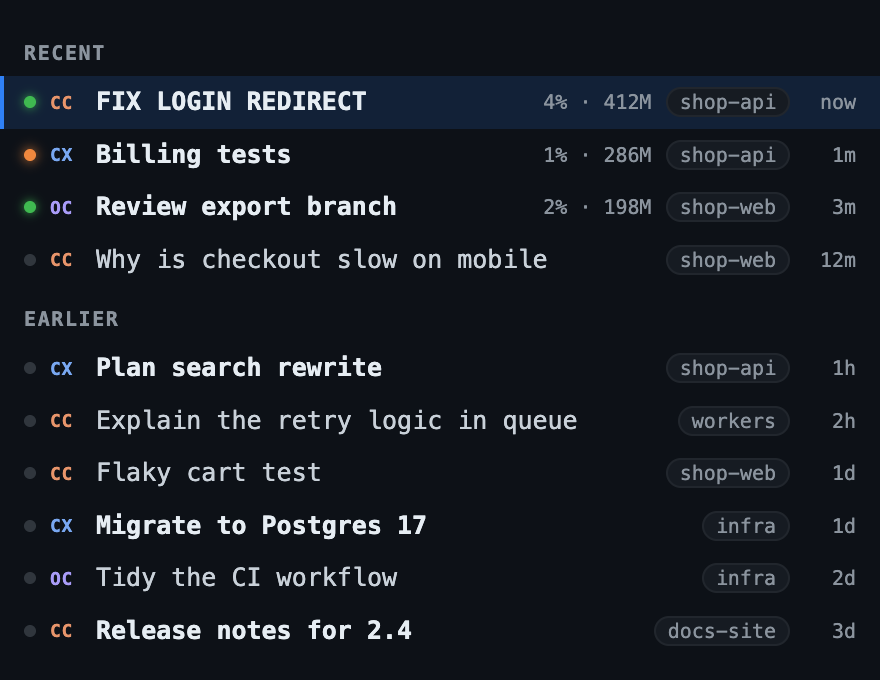
Every session in one list, whatever the agent. CC is Claude Code, CX is Codex, OC is OpenCode. A green dot means an agent is working, orange means it’s waiting for you, and you get a notification when one finishes or asks something. No hook scripts to write.
Named after the job. Rename any session right in the list, and archive the ones you’re done with. Sessions you started in a terminal show up too, so nothing needs importing.
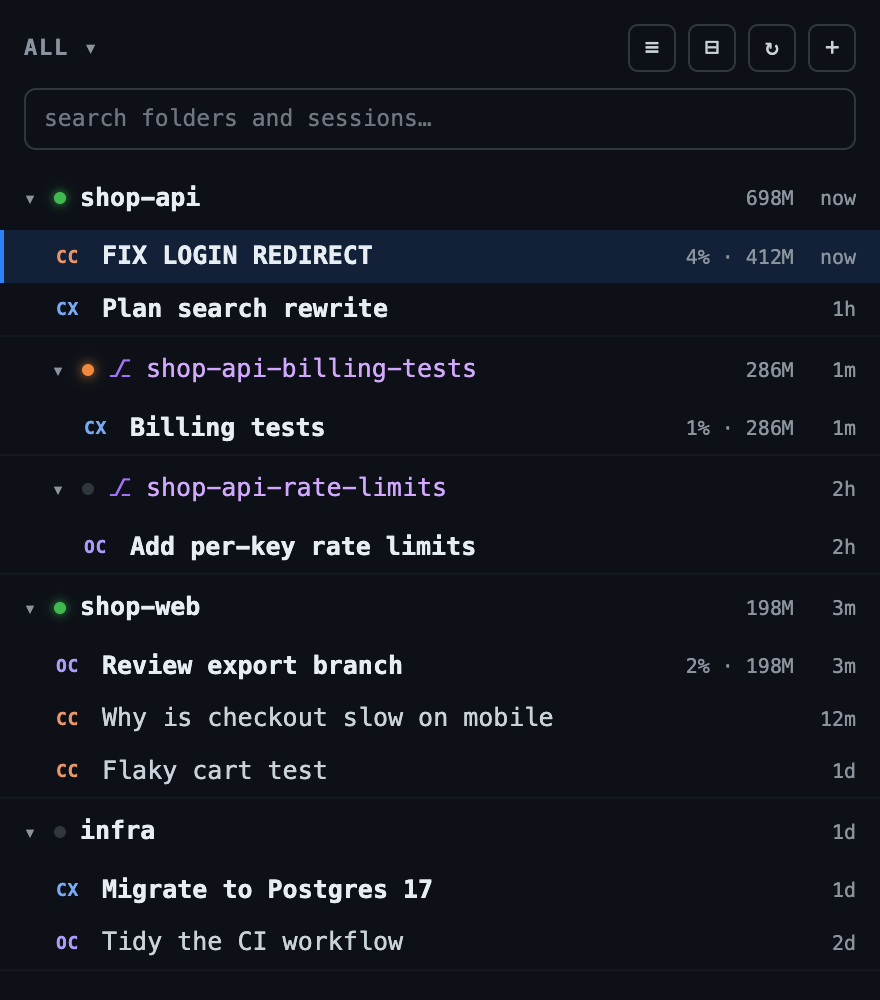
One folder per writer, without the typing. Sessions are grouped by folder. Click + next to a repo, choose a new worktree, name the branch, and an agent starts there. The worktree is listed under its repo, so you can see at a glance which agent is working on which branch.
Review in one place. Each folder’s Changes view shows what its agents changed as diffs. Comment on any line, send all the comments back to the agent as one message, then stage, commit and push from the same view.
See what it costs. Usage shows tokens and cost by agent, folder and day, so you know what the experiment is costing you, and which agent is earning its keep.
The short version
- Keep trying new agents on real work; the best one keeps changing.
- Give every agent that writes its own worktree.
- One job per session, named after the job.
- Get notified instead of watching tabs.
- Shared rules in
AGENTS.md; handoffs through commits andPLAN.md. - Review everything before it merges, and stop adding agents when reviews pile up.
Do it by hand with tabs and scripts, or let Nojace do the bookkeeping.
Using an agent or a tool Nojace doesn’t support yet? Open an issue and tell us what you need, or use Help → Report a Problem… in the app. What people ask for decides what we build next.
Published